
A clean office does more than create a good first impression. It gives employees a more comfortable place to work, keeps shared spaces presentable, and helps prevent dirt and germs from building up on frequently touched surfaces. The challenge is that office cleaning involves more than emptying trash cans and vacuuming floors.
From reception areas and workstations to break rooms, restrooms, conference rooms, and shared equipment, some cleaning tasks are easy to overlook.
That is why having a practical office cleaning checklist can make a big difference. It gives your cleaning team or office staff a consistent routine and helps make sure important areas are not missed.
Use the 15 tasks below as a starting point for maintaining a cleaner, more organized workplace.
Why Is an Office Cleaning Checklist Important?
Without a checklist, cleaning routines can quickly become inconsistent. One area may receive attention every day while another is forgotten for weeks.
A structured checklist helps organize cleaning responsibilities, establish appropriate cleaning frequencies, and create a consistent standard across the workplace. It can also make it easier for office managers to identify areas that need additional attention.
High-touch surfaces deserve particular attention. The CDC recommends regularly cleaning frequently touched surfaces and cleaning other surfaces when they are visibly dirty.
A good office cleaning routine should cover both the areas people notice immediately and the less obvious places where dust, dirt, spills, and germs can accumulate.
Office Cleaning Checklist: 15 Essential Tasks
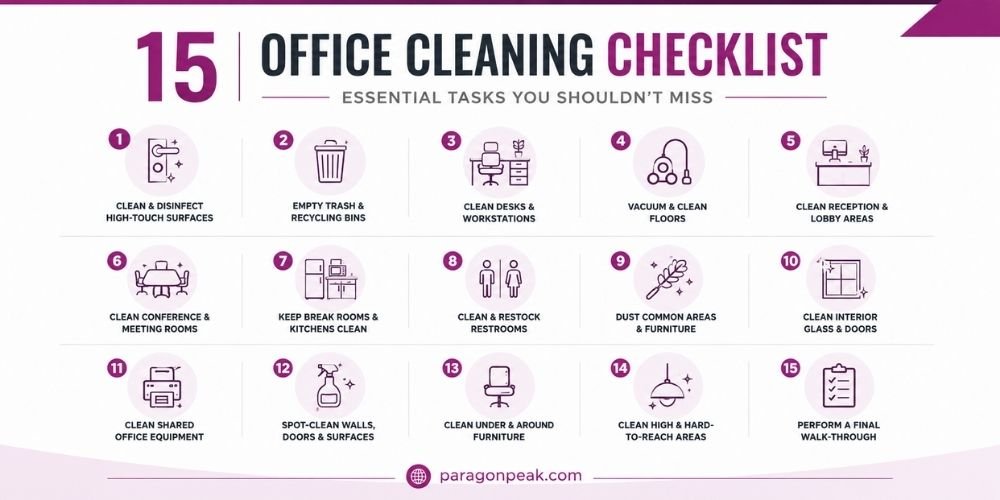
1. Clean and Disinfect High-Touch Surfaces
High-touch surfaces are among the most important items on an office cleaning checklist because they are handled repeatedly throughout the day.
Include surfaces such as:
- Door handles and push plates
- Light switches
- Elevator buttons
- Handrails
- Shared phones
- Printer and copier controls
- Touchscreens and shared devices
- Conference room remotes
- Thermostats
- Cabinet and appliance handles
These surfaces may not look dirty, but frequent contact makes them important parts of a regular cleaning routine. The CDC specifically recommends regularly cleaning high-touch surfaces such as door handles, desks, counters, light switches, and restroom fixtures.
Recommended frequency: Daily, with additional attention in busy or high-traffic areas.
2. Empty Trash and Recycling Bins
Overflowing trash can quickly make an otherwise clean office look neglected. Empty waste and recycling containers regularly and replace liners when needed.
Pay attention to bins located near:
- Individual workstations
- Break rooms
- Conference rooms
- Restrooms
- Reception areas
- Copy and printing stations
Cleaning the inside and outside of bins periodically can also help prevent odors and buildup.
Recommended frequency: Daily or whenever bins become full.
3. Clean Desks and Workstations
Workstations collect dust, fingerprints, crumbs, and everyday debris. Desks, tables, shelves, and other accessible surfaces should be dusted and wiped as part of the regular cleaning routine.
Shared workstations and hot desks deserve additional attention because multiple employees may use the same surface throughout the day.
When cleaning electronics such as monitors, keyboards, mice, and phones, always follow the manufacturer’s cleaning instructions and use products appropriate for the surface.
Recommended frequency: Daily for shared surfaces; dusting and more detailed cleaning can be scheduled regularly based on use.
4. Vacuum Carpets and Clean Hard Floors
Floors receive some of the heaviest traffic in an office, making floor care an essential part of the checklist.
For carpeted areas:
- Vacuum entrances and high-traffic paths
- Remove visible debris and dirt
- Spot-clean spills and stains
- Pay attention to areas underneath and around furniture
For hard floors:
- Sweep or vacuum loose debris
- Damp-mop as appropriate for the flooring material
- Address spills promptly
- Pay extra attention to entrances and high-traffic areas
Regular floor care can also help protect flooring from the gradual buildup of dirt and debris.
Recommended frequency: High-traffic areas daily; complete floor cleaning according to traffic and flooring type.
5. Clean Reception and Lobby Areas
Your reception area is often the first part of the office a client, customer, or visitor sees.
The checklist should include:
- Reception desks and counters
- Waiting-area tables
- Chairs and other accessible furniture
- Entry doors and glass
- Floors and entrance mats
- Visible fingerprints and smudges
- Trash and recycling bins
A clean, organized entrance creates a more professional environment before a visitor even reaches the main office.
Recommended frequency: Daily, with spot cleaning as needed.
6. Clean Conference and Meeting Rooms
Conference rooms can become surprisingly messy after a busy day of meetings.
Check these areas regularly:
- Conference tables
- Chairs
- Whiteboards and ledges
- Remote controls
- Shared technology
- Door handles
- Glass partitions
- Floors
- Trash and recycling bins
Shared equipment and high-touch surfaces deserve special attention because many different employees may use them throughout the day.
Recommended frequency: Daily or after heavy use.
7. Keep Break Rooms and Kitchens Clean
Break rooms combine food, beverages, shared appliances, sinks, counters, and high-touch surfaces, making them one of the most important areas on an office cleaning checklist.
Clean and inspect:
- Countertops
- Sinks and faucets
- Microwave interiors and handles
- Refrigerator handles
- Coffee makers and other shared appliances
- Tables and chairs
- Cabinet handles
- Floors
- Trash and recycling bins
Spills and food debris should be cleaned promptly rather than left until the next scheduled cleaning visit.
Recommended frequency: Daily, with deeper appliance and refrigerator cleaning scheduled as needed.
8. Clean and Restock Restrooms
Restrooms require consistent cleaning because they are high-use areas that directly affect employee and visitor comfort.
A restroom checklist should include:
- Toilets and urinals
- Sinks and faucets
- Countertops
- Mirrors
- Floors
- Door handles
- Dispensers
- Trash bins
- Soap
- Toilet paper
- Paper towels or hand-drying supplies
Don’t stop at visible surfaces. Check corners, behind fixtures, and other areas where dirt or moisture can accumulate.
Recommended frequency: Daily at minimum, with frequency adjusted for occupancy and traffic.
9. Dust Common Areas and Furniture
Dust can accumulate on surfaces that are not part of everyday desk cleaning.
Include:
- Shelving
- File cabinets
- Window sills
- Baseboards
- Furniture
- Decorative items
- Accessible vents
- Ledges
- Reception furniture
In areas where fine dust accumulates quickly, damp wiping can be preferable to simply moving dust from one surface to another.
Recommended frequency: Weekly for many areas, with more frequent dusting where needed.
10. Clean Interior Glass and Doors
Fingerprints and smudges can make a clean office look less polished.
Clean:
- Entry doors
- Interior glass doors
- Conference room glass
- Glass partitions
- Reception glass
- Interior windows where included in the cleaning plan
Pay special attention to areas around handles where fingerprints tend to accumulate.
Recommended frequency: Weekly or as needed for high-traffic areas.
11. Clean Shared Office Equipment
Printers, copiers, phones, keyboards, conference room controls, and other shared equipment can receive constant use.
These surfaces should be cleaned carefully using products and methods appropriate for the equipment. Electronics should never be treated exactly like ordinary hard surfaces; manufacturer’s instructions should be followed.
Include:
- Printer and copier controls
- Shared phones
- Keyboards and mice
- Conference room remotes
- Touchscreens
- Shared tablets or sign-in devices
- Other frequently handled controls
Recommended frequency: Daily for heavily shared touchpoints; otherwise according to use.
12. Spot-Clean Walls, Doors, and Other Visible Surfaces
Not every cleaning task needs to happen every day, but visible marks should not be ignored until the next deep-cleaning appointment.
Look for:
- Fingerprints
- Scuff marks
- Food or drink stains
- Spills
- Marks around doorways
- Smudges near switches and handles
Spot cleaning helps maintain a polished appearance between more detailed cleaning sessions.
Recommended frequency: As needed.
13. Clean Areas Under and Around Furniture
One commonly overlooked office cleaning task is cleaning where people don’t immediately look.
Dust and debris can collect:
- Under desks
- Beneath conference tables
- Around chair legs
- Behind cabinets
- Along baseboards
- Under reception furniture
- Around printers and equipment
Move accessible furniture when appropriate and safe so floors and surrounding surfaces receive proper attention.
Recommended frequency: Weekly or according to the cleaning schedule.
14. Pay Attention to High and Hard-to-Reach Areas
A room can look clean at eye level while dust is building up above it.
Depending on the facility and equipment available, include:
- Light fixtures
- High ledges
- Vents
- Tops of cabinets
- Ceiling corners
- High shelving
- Other accessible elevated surfaces
These areas usually do not require daily attention, but they should be included in a broader deep-cleaning schedule.
Recommended frequency: Monthly or as determined by the facility.
15. Perform a Final Walk-Through
The last step is easy to overlook, but it can help maintain consistency.
Before considering the office clean, walk through the facility and check:
- Are trash bins empty?
- Are restrooms clean and stocked?
- Are floors free of visible debris?
- Are high-touch areas addressed?
- Are conference rooms ready for use?
- Are break rooms clean?
- Are glass surfaces free of obvious smudges?
- Are spills or stains addressed?
- Are supplies properly restocked?
- Is anything noticeably out of place?
A final inspection allows the cleaning team to catch small issues before employees or visitors do.
Recommended frequency: Every cleaning visit.
Daily, Weekly, and Monthly Office Cleaning Checklist
Not every cleaning task needs to happen at the same frequency. A practical schedule helps your team focus on high-priority areas while still making time for deeper cleaning.
| Cleaning Task | Daily | Weekly | Monthly/Periodic |
|---|---|---|---|
| High-touch surfaces | ✓ | ||
| Trash and recycling | ✓ | ||
| Restrooms | ✓ | ✓ | |
| Break rooms | ✓ | ✓ | |
| Reception areas | ✓ | ||
| Workstations | ✓ | ✓ | |
| Conference rooms | ✓ | ✓ | |
| High-traffic floors | ✓ | ||
| Detailed floor care | ✓ | ✓ | |
| Interior glass | ✓ | ||
| Baseboards and ledges | ✓ | ||
| High dusting | ✓ | ||
| Deep carpet cleaning | ✓/Periodic | ||
| Areas behind furniture | ✓ | ✓ | |
| Detailed equipment cleaning | ✓ | ✓ |
The exact schedule should be adjusted according to office size, employee count, foot traffic, facility type, and operating hours. Current office-cleaning guidance similarly recommends tailoring frequency to traffic and the needs of each space rather than treating every workplace identically.
Common Office Cleaning Mistakes to Avoid
Even offices with a regular cleaning routine can miss important details. Watch out for these common mistakes:
Only cleaning what is visible
A spotless desk does not mean the entire workspace is clean. Door handles, switches, shared equipment, and other frequently touched surfaces also need attention.
Treating every area the same
A restroom, conference room, workstation, and carpeted hallway have different cleaning requirements. Your checklist should reflect those differences.
Forgetting shared equipment
Printers, phones, keyboards, remotes, and touchscreens can be used by many people and should not be overlooked.
Ignoring high and low areas
Dust can accumulate on vents, ledges, baseboards, and underneath furniture even when the main surfaces look clean.
Using the same cleaning method for every surface
Different materials require different products and techniques. Electronics, glass, flooring, wood, and other surfaces should be cleaned according to their care requirements.
Not adjusting the schedule
A fixed schedule may not be enough when occupancy, foot traffic, seasons, or business operations change.
When Should You Consider Professional Office Cleaning?
An in-house team can handle basic tidying, but maintaining an entire office consistently can become difficult when employees are focused on their primary responsibilities.
Professional office cleaning services can be especially useful when:
- Your office has high daily foot traffic
- Restrooms and break rooms need frequent attention
- Your employees don’t have time to maintain common areas
- Cleaning quality varies from one visit to another
- You need cleaning outside normal business hours
- Your office has multiple floors or large common areas
- You want a customized cleaning schedule
- You need specialized floor or facility maintenance
A professional cleaning provider can create a routine based on your facility rather than relying on a one-size-fits-all checklist.
Final Thoughts
A clean office doesn’t happen by accident. It comes from having a consistent routine that covers both the areas employees see every day and the surfaces that are easy to overlook.
Use this office cleaning checklist as a starting point, adjust the frequency based on your workplace, and review it regularly as your business needs change.
If keeping up with office cleaning is taking time away from your team, Paragon Peak Building Maintenance can create a customized cleaning plan to help keep your workplace clean, organized, and ready for employees and visitors.
Frequently Asked Questions
What are the most important areas to clean in an office?
High-touch surfaces, restrooms, break rooms, workstations, entrances, floors, and shared equipment should be among the highest priorities because they receive frequent use.
Should office cleaning be done during or after business hours?
Either can work depending on the workplace. Many businesses prefer cleaning during early mornings, evenings, or other low-traffic periods to minimize disruption. Paragon Peak offers scheduling designed around business operating hours and facility access requirements.
Can a professional cleaning company customize an office cleaning checklist?
Yes. Cleaning frequency and scope can be adjusted based on office size, employee count, foot traffic, facility layout, operating hours, and the areas that require the most attention.
What is the difference between cleaning and disinfecting?
Cleaning removes dirt and impurities from surfaces, while disinfecting is intended to kill harmful germs that remain after cleaning. The CDC recommends cleaning surfaces before sanitizing or disinfecting them because dirt and other impurities can interfere with disinfectant effectiveness.